
wxStyledTextCtrl
Introduction
The wxStyledTextCtrl (wxWidgets: wxStyledTextCtrl Class Reference) control is a source code editing component. It is a wrapper around the Scintilla source code editing component (http://www.scintilla.org/).
Basic Creation Example
The wxStyledTextCtrl control is a very powerful control and it takes some learning to take fully advantage of it. We will start with a very basic example that doesn't do much more than a simple wxTextCtrl. The example is based on the MinimalApp2 example we presented in the minimal application tutorial. The full source for this example is available from our GitHub repository: wxWidgetsTutorials/wxStyledTextCtrl/WxStyledTextCtrl1.
#include "WxStyledTextCtrl1Frame.h"
#include <wx/panel.h>
#include <wx/stc/stc.h>
#include <wx/sizer.h>

WxStyledTextCtrl1Frame::WxStyledTextCtrl1Frame(const wxString& title)
    : wxFrame(NULL, wxID_ANY, title)
{
    // Create a top-level panel to hold all the contents of the frame
    wxPanel* panel = new wxPanel(this, wxID_ANY);

    // Create a wxStyledTextCtrl control
    wxStyledTextCtrl* styledTextCtrl = new wxStyledTextCtrl(panel, wxID_ANY,
        wxDefaultPosition, wxSize(350, 200));

    styledTextCtrl->AddText("// A simple program\n\n");
    styledTextCtrl->AddText("#include <stdio.h>\n\n");
    styledTextCtrl->AddText("int main(int argc, char* argv[])\n");
    styledTextCtrl->AddText("{\n");
    styledTextCtrl->AddText("    printf(\"Hello World!\");\n");
    styledTextCtrl->AddText("    return 0;\n");
    styledTextCtrl->AddText("}\n");

    // Set up the sizer for the panel
    wxBoxSizer* panelSizer = new wxBoxSizer(wxHORIZONTAL);
    panelSizer->Add(styledTextCtrl, 1, wxEXPAND);
    panel->SetSizer(panelSizer);

    // Set up the sizer for the frame and resize the frame
    // according to its contents
    wxBoxSizer* topSizer = new wxBoxSizer(wxHORIZONTAL);
    topSizer->Add(panel, 1, wxEXPAND);
    SetSizerAndFit(topSizer);
}
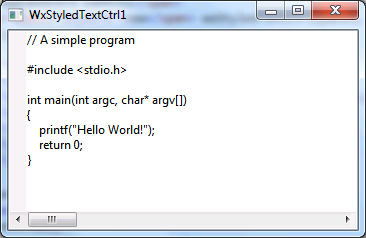
The application is shown in Figure 1 below.
|
The rest of the files don't have any significant changes but are shown here for completeness.
#ifndef _TUTORIALS_WXWIDGETS_WXSTYLEDTEXTCTRL1FRAME_H_
#define _TUTORIALS_WXWIDGETS_WXSTYLEDTEXTCTRL1FRAME_H_

#include <wx/frame.h>

class WxStyledTextCtrl1Frame : public wxFrame
{
public:
    WxStyledTextCtrl1Frame(const wxString& title);
};

#endif
#ifndef _TUTORIALS_WXWIDGETS_WXSTYLEDTEXTCTRL1APP_H_
#define _TUTORIALS_WXWIDGETS_WXSTYLEDTEXTCTRL1APP_H_

#include <wx/app.h>

class WxStyledTextCtrl1App : public wxApp
{
public:
    virtual bool OnInit();
};

#endif
#include "WxStyledTextCtrl1App.h"
#include "WxStyledTextCtrl1Frame.h"

wxIMPLEMENT_APP(WxStyledTextCtrl1App);

bool WxStyledTextCtrl1App::OnInit()
{
    WxStyledTextCtrl1Frame* frame = new WxStyledTextCtrl1Frame("WxStyledTextCtrl1");
    frame->Show(true);
    return true;
}
C++ Lexer Example
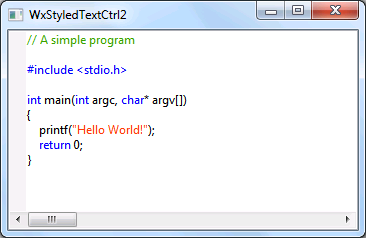
The previous example was displaying the code correctly but wasn't applying any specific highlighting that we would expect from a code editor. In this example we show how we can modify the code to recognize that the contents are C++ code and highlight some keywords.The full source for this example is available from our GitHub repository: wxWidgetsTutorials/wxStyledTextCtrl/WxStyledTextCtrl2.
#include "WxStyledTextCtrl2Frame.h"
#include <wx/panel.h>
#include <wx/stc/stc.h>
#include <wx/sizer.h>

WxStyledTextCtrl2Frame::WxStyledTextCtrl2Frame(const wxString& title)
    : wxFrame(NULL, wxID_ANY, title)
{
    // Create a top-level panel to hold all the contents of the frame
    wxPanel* panel = new wxPanel(this, wxID_ANY);

    // Create a wxStyledTextCtrl control
    wxStyledTextCtrl* styledTextCtrl = new wxStyledTextCtrl(panel, wxID_ANY,
        wxDefaultPosition, wxSize(350, 200));

    // Set the lexer to the C++ lexer
    styledTextCtrl->SetLexer(wxSTC_LEX_CPP);

    // Set the color to use for various elements
    styledTextCtrl->StyleSetForeground(wxSTC_C_COMMENTLINE, wxColor(60, 162, 2));
    styledTextCtrl->StyleSetForeground(wxSTC_C_PREPROCESSOR, wxColor(0, 0, 255));
    styledTextCtrl->StyleSetForeground(wxSTC_C_STRING, wxColor(255, 60, 10));
    styledTextCtrl->StyleSetForeground(wxSTC_C_WORD, wxColor(0, 0, 255));

    // Give a list of keywords. They will be given the style specified for
    // wxSTC_C_WORD items.
    styledTextCtrl->SetKeyWords(0, wxT("return int char"));

    // Populate the wxStyledTextCtrl with a small C++ program
    styledTextCtrl->AddText("// A simple program\n\n");
    styledTextCtrl->AddText("#include <stdio.h>\n\n");
    styledTextCtrl->AddText("int main(int argc, char* argv[])\n");
    styledTextCtrl->AddText("{\n");
    styledTextCtrl->AddText("    printf(\"Hello World!\");\n");
    styledTextCtrl->AddText("    return 0;\n");
    styledTextCtrl->AddText("}\n");

    // Set up the sizer for the panel
    wxBoxSizer* panelSizer = new wxBoxSizer(wxHORIZONTAL);
    panelSizer->Add(styledTextCtrl, 1, wxEXPAND);
    panel->SetSizer(panelSizer);

    // Set up the sizer for the frame and resize the frame
    // according to its contents
    wxBoxSizer* topSizer = new wxBoxSizer(wxHORIZONTAL);
    topSizer->Add(panel, 1, wxEXPAND);
    SetSizerAndFit(topSizer);
}
|
#ifndef _TUTORIALS_WXWIDGETS_WXSTYLEDTEXTCTRL2FRAME_H_
#define _TUTORIALS_WXWIDGETS_WXSTYLEDTEXTCTRL2FRAME_H_

#include <wx/frame.h>

class WxStyledTextCtrl2Frame : public wxFrame
{
public:
    WxStyledTextCtrl2Frame(const wxString& title);
};

#endif
#ifndef _TUTORIALS_WXWIDGETS_WXSTYLEDTEXTCTRL2APP_H_
#define _TUTORIALS_WXWIDGETS_WXSTYLEDTEXTCTRL2APP_H_

#include <wx/app.h>

class WxStyledTextCtrl2App : public wxApp
{
public:
    virtual bool OnInit();
};

#endif
#include "WxStyledTextCtrl2App.h"
#include "WxStyledTextCtrl2Frame.h"

wxIMPLEMENT_APP(WxStyledTextCtrl2App);

bool WxStyledTextCtrl2App::OnInit()
{
    WxStyledTextCtrl2Frame* frame =  new WxStyledTextCtrl2Frame("WxStyledTextCtrl2");
    frame->Show(true);
    return true;
}