
wxDirPickerCtrl
Introduction
The wxDirPickerCtrl (wxWidgets: wxDirPickerCtrl Class Reference) control implements a control to select a directory path. A text box is provided where the path can be entered manually but a dialog can also be launched to select the directory.
An example of a wxDirPickerCtrl is shown in Figure 1 below.

|
Example
The wxDirPickerCtrl control is easy to use. Below we show a simple example of a wxDirPickerCtrl with an event handler that updates the value of a wxTextCtrl control when the selected directory is changed. The example is a simple modification of the MinimalApp2 example we presented in the minimal application tutorial. The full source for this example is available from our GitHub repository: wxWidgetsTutorials/PickerControls/WxDirPickerCtrl1.
The source files are shown below. The following modifications were made:
- A wxTextCtrl and wxDirPickerCtrl have been added to the frame.
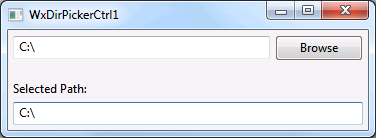
- The OnPathChanged method is the event handler for the wxDirPickerCtrl. It updates the contents of the wxTextCtrl to match the currently selected path.
- The event table links the wxDirPickerCtrl and its event handler.
#ifndef _TUTORIALS_WXWIDGETS_WXDIRPICKERCTRL1FRAME_H_
#define _TUTORIALS_WXWIDGETS_WXDIRPICKERCTRL1FRAME_H_

#include <wx/frame.h>
#include <wx/filepicker.h>
#include <wx/textctrl.h>

class WxDirPickerCtrl1Frame : public wxFrame
{
public:
    WxDirPickerCtrl1Frame(const wxString& title);

private:
    void OnPathChanged(wxFileDirPickerEvent& evt);

private:
    wxTextCtrl* m_textCtrl;

    wxDECLARE_EVENT_TABLE();
};

#endif
#include "WxDirPickerCtrl1Frame.h"
#include "WindowIDs.h"
#include <wx/panel.h>
#include <wx/stattext.h>
#include <wx/sizer.h>

WxDirPickerCtrl1Frame::WxDirPickerCtrl1Frame(const wxString& title)
    : wxFrame(NULL, wxID_ANY, title), m_textCtrl(0)
{
    // Create a top-level panel to hold all the contents of the frame
    wxPanel* panel = new wxPanel(this, wxID_ANY);

    // Create a wxFilePickerCtrl control
    wxDirPickerCtrl* dirPickerCtrl = new wxDirPickerCtrl(panel, DirPickerID,
        wxEmptyString, wxDirSelectorPromptStr,
        wxDefaultPosition, wxSize(350, wxDefaultCoord));

    // We add a wxTextCtrl that will contain the same path as
    // the wxDirPickerCtrl. This is done by using the event
    // generated by the wxDirPickerCtrl when the path changes.
    wxStaticText* staticText = new wxStaticText(panel, wxID_ANY, "Selected Path:");
    m_textCtrl = new wxTextCtrl(panel, wxID_ANY);

    // Set up the sizer for the panel
    wxBoxSizer* panelSizer = new wxBoxSizer(wxVERTICAL);
    panelSizer->Add(dirPickerCtrl, 0, wxEXPAND | wxALL, 5);
    panelSizer->AddSpacer(15);
    panelSizer->Add(staticText, 0, wxEXPAND | wxLEFT, 5);
    panelSizer->Add(m_textCtrl, 0, wxEXPAND | wxALL, 5);
    panel->SetSizer(panelSizer);

    // Set up the sizer for the frame and resize the frame
    // according to its contents
    wxBoxSizer* topSizer = new wxBoxSizer(wxHORIZONTAL);
    topSizer->Add(panel, 1, wxEXPAND);
    SetSizerAndFit(topSizer);
}

// This event handler will be called when the path
// of the wxDirPickerCtrl has changed
void WxDirPickerCtrl1Frame::OnPathChanged(wxFileDirPickerEvent& evt)
{
    if (m_textCtrl)
    {
        m_textCtrl->SetValue(evt.GetPath());
    }
}

// Add the event handler to the event table. As you can see we use the
// window ID to link the event handler to the wxDirPickerCtrl we created.
wxBEGIN_EVENT_TABLE(WxDirPickerCtrl1Frame, wxFrame)
    EVT_DIRPICKER_CHANGED(DirPickerID, WxDirPickerCtrl1Frame::OnPathChanged)
wxEND_EVENT_TABLE()
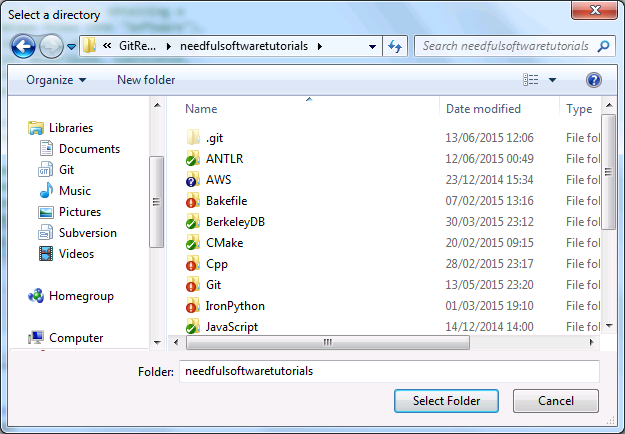
The application is shown below. Figure 2 shows the application with the wxDirPickerCtrl and Figure 3 shows the dialog that gets launched if the browse button is pressed.
|
|
The rest of the source files don't contain significant changes but are shown here for completeness.
#ifndef _TUTORIALS_WXWIDGETS_WXDIRPICKERCTRL1APP_H_
#define _TUTORIALS_WXWIDGETS_WXDIRPICKERCTRL1APP_H_

#include <wx/app.h>

class WxDirPickerCtrl1App : public wxApp
{
public:
    virtual bool OnInit();
};

#endif
#include "WxDirPickerCtrl1App.h"
#include "WxDirPickerCtrl1Frame.h"

wxIMPLEMENT_APP(WxDirPickerCtrl1App);

bool WxDirPickerCtrl1App::OnInit()
{
    WxDirPickerCtrl1Frame* frame = new WxDirPickerCtrl1Frame("WxDirPickerCtrl1");
    frame->Show(true);
    return true;
}